Kerosene
The Colour Machine
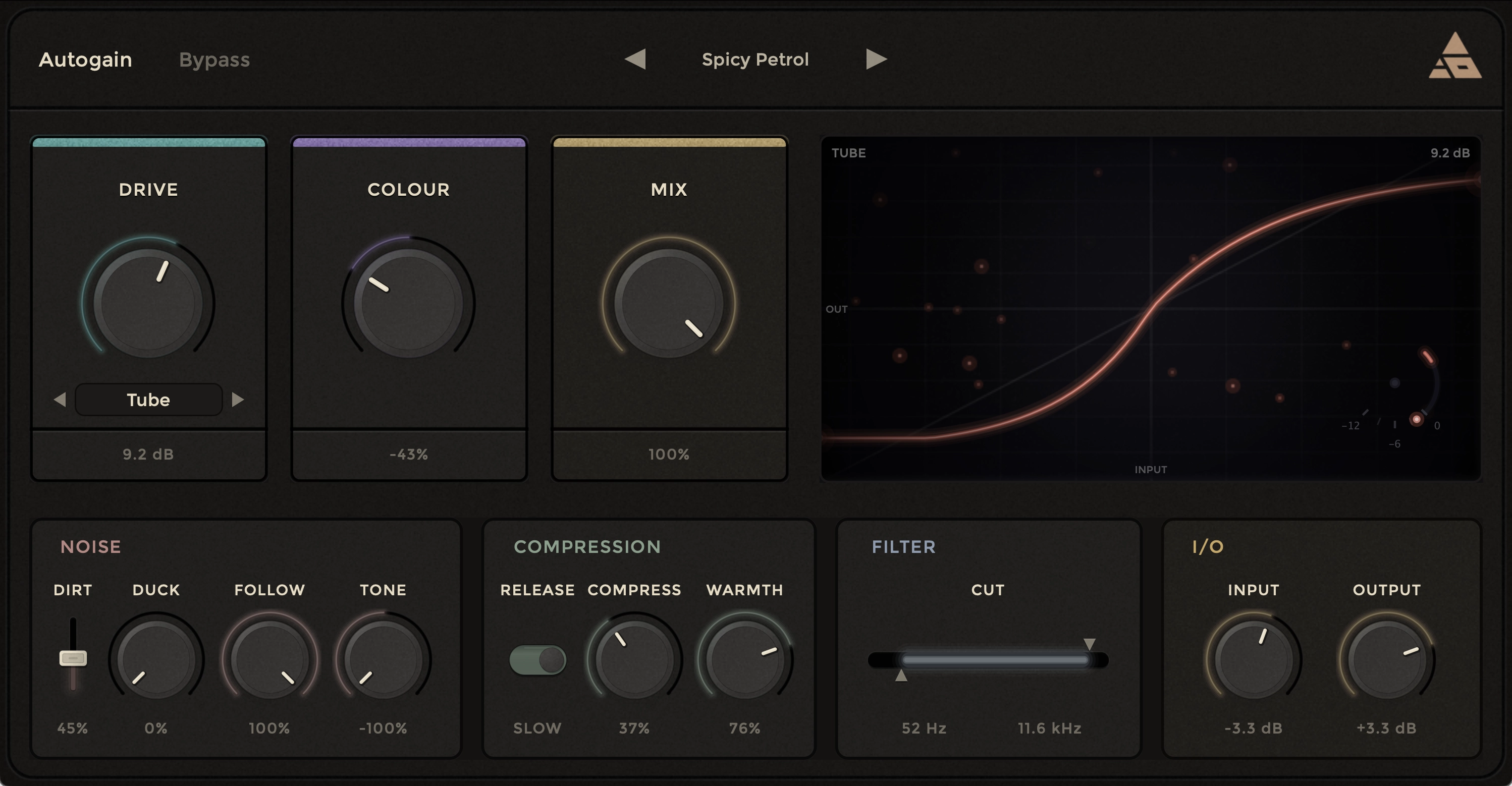
The saturation plugin which does a lot more than just saturation.
Give your sound character.
Four drive modes covering soft clip, hard clip, tube, and tape. A noise engine that breathes with the music.
A compressor that finishes the job. Everything you need to put life back into a digital signal, sitting on top of a real-time visualiser that shows you exactly what is happening to your sound.
Built for working studios. Tested by working engineers.
Kerosene is a really well thought out, simple to use, great sounding plugin. The distortion sounds fab, and Tube is probably my favourite mode.
Four ways to drive a signal.
The drive section is the heart of Kerosene. Pick a mode that suits the source and dial in the amount. Each mode produces a distinct harmonic fingerprint that evolves as you push it harder, and the visualiser updates in real time so you can see the curve change shape as you work.
Soft Clip
The forgiving one.
Peaks gently rounded as they approach the clipping point. Predominantly odd harmonics, with a pre-emphasis filter that adds top-end presence without harshness. The one for buses, masters, and warmth without an obvious distortion character.
Hard Clip
The aggressive one.
Peaks sharply truncated. Harsher tone with both odd and even harmonics, and the Color control sets the threshold itself - darker settings clip earlier and harder. PolyBLEP correction keeps the result clean even when pushed. Reach for this on drums, aggressive vocals, or anything that needs an audible edge.
Tube
The asymmetric one.
Asymmetric saturation modelled on valve circuits. Positive and negative halves of the signal are processed differently, producing a rich blend of even and odd harmonics that the Color control biases between. Warm, punchy, naturally dynamic. Excellent on bass, vocals, and anything where harmonic richness matters more than precision.
Tape
The cohesive one.
Magnetic hysteresis modelling, with internal state held per channel so previous samples affect how current ones are processed. That subtle temporal smearing is what gives real tape its cohesion - and what makes this mode glue a mix together in a way nothing else here can. Sample-rate-compensated; the character holds at any rate.
Hear what character sounds like.
Toggle between dry and wet on real material like acoustic guitar, electric bass, drum bus and urban beats, to hear what each saturation stage actually does.
So easy to pour all over your tracks and suddenly you have created hot fire.
More than a saturator.
A colour box built for character.
Drive, Colour, Mix.
Three dials handle the heavy lifting. Drive runs from −12 dB to +24 dB and pushes the signal into the chosen curve. Colour is a bipolar tone control that sits before the saturation stage, so it changes which frequencies actually get driven - dark Colour saturates the low end, bright Colour pushes more high end into the curve. Mix is your parallel control, blending a heavily driven signal underneath the original to add density without losing transients.
A noise engine that listens.
Most plugins treat noise as a static layer you sprinkle on top. Kerosene treats it as a living element that reacts to your audio. Dirt sets the amount. Duck pulls the noise down when the music is loud and lets it rise in the quiet, like a real analog noise floor. Follow does the opposite, riding up with transients to add bursts of grit that decay with the signal. Use them together and the noise becomes its own dynamic instrument. The noise sits before saturation, so it gets driven along with your audio - texture that feels integrated, not pasted on.
A compressor that finishes the job.
Post-saturation compression with a soft-knee design that engages gradually rather than slamming on at the threshold. A sidechain high-pass at 80 Hz keeps low-frequency content from pumping the whole mix. The Warmth control adds a second saturation stage inside the compressor itself, stacking on top of whatever the main drive is doing for extra harmonic density. Release toggles between fast for punchy material and slow for sustained sources and bus work.
Filters that shape what gets driven.
The Cut control is a single frequency window with two handles, one for high-pass and one for low-pass. Drag them independently or move the whole window together. Both filters sit before the saturation stage, so they decide which frequencies actually become harmonics. Bring the handles close together to isolate a narrow band for frequency-targeted parallel saturation. Combined with the Mix dial, this opens up sound design territory most saturation plugins simply do not reach.
A visualiser that actually teaches.
The transfer function visualiser shows what every control is doing to your signal in real time. A straight diagonal means clean. As Drive and Colour and saturation type change, the curve bends and reshapes. When audio plays, your signal trace maps through the curve so you can see exactly how the waveform is being shaped. Switch between modes at the same drive setting and watch how the curve changes. What you see lines up with what you hear.
Autogain for honest comparisons.
Drive is a gain control, so it makes things louder. Louder usually sounds better, even when it is not. Autogain compensates per algorithm, applying an opposing reduction based on the gain profile of whichever mode is selected, so you can A/B against the bypassed signal at matched volume and judge the saturation on its own merits. The only reliable way to know what the processing is actually doing to your sound.
Forty-one presets, organised by source.
Vocals, drums, bass, guitar, synths, mix bus, creative, and parallel. Each preset is a starting point, not a finished destination. Browse them with the arrow keys or open the full menu to jump straight to a category. Save your own with one click and they live in their own folder, separate from the factory bank, ready to manage on disk however you like.
Kerosene is a secret, special sauce for saturating and adding spice to individual sounds, stems, or even whole songs.
Pull up almost any record you love from before the digital age. There is noise in it.
Tape hiss sitting under the mix. Hum from a guitar amp. Spill from the room into the vocal mic. Compression doing things compressors are not supposed to do. The signal path was alive with character that nobody planned and nobody removed.
Listen to Hospital by The Modern Lovers, recorded 1976. The track sits on a floor of noise that adds a weight to the whole thing. Strip the noise out and the song goes flat. Listen to Hurt by Johnny Cash as the distortion swells in the final minute, the palpable sound of circuits being pushed past where they were meant to go. The discomfort is the point. It is what makes the lyric land.
Modern digital tools do an extraordinary job of removing every imperfection. Cleaner signal paths, lower noise floors, surgical precision on every channel. The bill for all that cleanliness is character. Music made entirely inside the box can sound flat and uninspiring even when every individual element is technically perfect. Producers spend hours trying to put back what their tools have spent the whole session taking away.
Kerosene is built to put it back. Not by modelling a specific 1962 console nobody has heard, but by giving you the tools to introduce noise, drive, harmonic content, and cohesion at the points where they matter, with controls that respond like instruments rather than buttons on a calculator. The point is not to make everything sound vintage. The point is to make everything sound like something.
Kerosene is just the right plugin to quickly add colour, character, and warp to all kinds of audio sources. Intuitive to use, flexible to experiment with, super simple to get a bigger, bolder sound. I have used it tons on a new album I am working on.
Built for the DAWs you
actually work in.
Specifications.
Native Apple Silicon. 64-bit Windows. Engineered to sit alongside the tools you already trust without fighting your session for resources.
- FormatsVST3, Audio Units, and AAX. Native Apple Silicon. 64-bit Windows.
- Operating systemsmacOS 13 or later · Windows 10 or later
- Hardware4 GB RAM minimum · 8 GB recommended · 50 MB disk
- DAW compatibilityLogic Pro · Ableton Live · Pro Tools · FL Studio · Cubase · Reaper · any host that supports VST3 or Audio Units
- EngineAdaptive - Up to 8× oversampling on the saturation stage. DC blocking on every algorithm. Per-channel state on Tape mode and the noise engine. All parameter changes smoothed to prevent zipper noise.
- ActivationOnline and offline activation supported. Free Acedia Audio account required.
Things producers want to know.
Ready to put character back in?
Try Kerosene free for 14 days. Full functionality, no card required, no time-limited features hiding behind a paywall. If it does what you need, the activation window is one click away.